DNS Record Types...

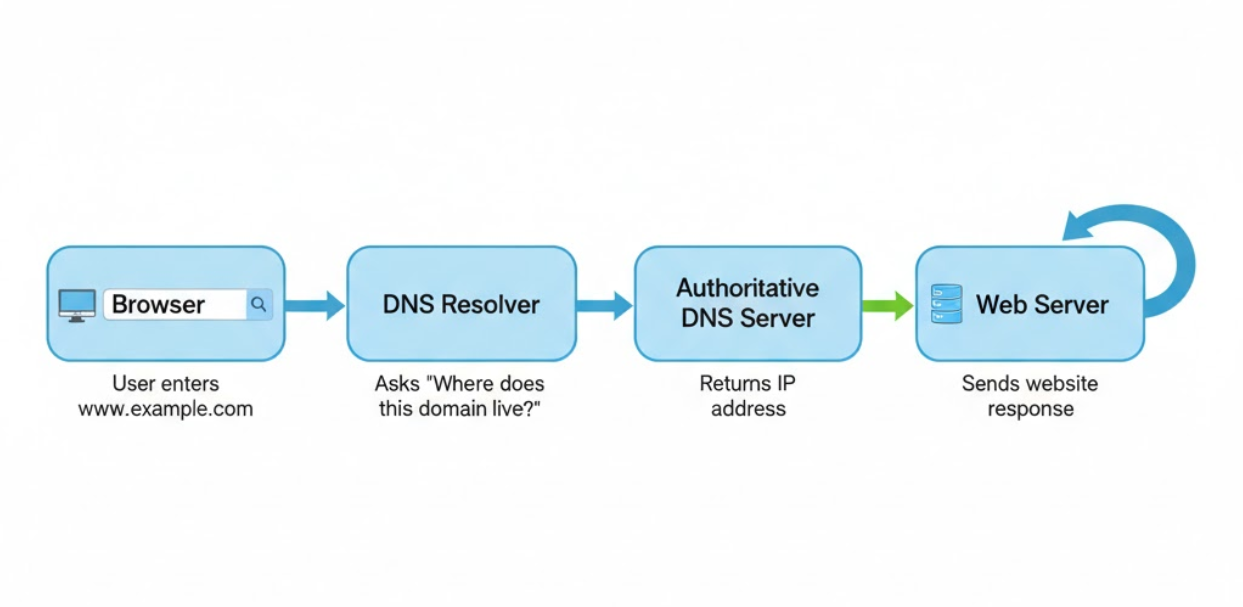
Have you ever wondered, how does a browser know where a website lives?
When you type a website name like:
“www.google.com” into your browser, your computer has no idea where that website actually lives.Browsers don’t understand names.
They only understand IP addresses (numbers).
That’s where DNS comes in.
What is DNS?
DNS (Domain Name System) is the phonebook of the internet.
Humans remember names →
google.comComputers remember numbers →
142.250.190.14
DNS translates: google.com → IP address
Without DNS, you would need to remember numbers for every website you visit.
Why DNS Records Are Needed
DNS doesn’t work using a single instruction.
Instead, it uses multiple DNS record types, and each record solves a specific problem, such as:
Who manages this domain?
Where is the website hosted?
Where should emails be delivered?
Is this domain verified?
Each DNS record answers one clear question.
NS Record – Who Is Responsible for the Domain?
NS (Name Server) records define who is responsible for managing DNS for a domain.
They tell the internet:
“Ask these name servers for all DNS information.”
Real-life example
Think of NS records like a city office that keeps address records for houses.
Without NS records:
No one knows where to ask
The domain will not work
A Record – Domain to IPv4 Address
A (Address) records map a domain name to an IPv4 address.
Example: example.com → 93.184.216.34
This is how a browser finds the web server.
Real-life example :
House name → House number
AAAA Record – Domain to IPv6 Address
AAAA records do the same job as A records, but for IPv6.
Example: example.com → 2001:db8::ff00:42:8329
Why it exists:
IPv4 addresses are limited
IPv6 supports the growing internet
If your server supports IPv6, you use AAAA records.
CNAME Record – One Name Pointing to Another Name
CNAME (Canonical Name) records make one domain an alias of another.
Example: www.example.com → example.com
Real-life example
“Office” → “Head Office”
Different names, same location.
Common Confusion: A vs CNAME
A record → points to an IP address
CNAME record → points to another domain name
MX Record – How Emails Find Your Mail Server
MX (Mail Exchange) records tell the internet where emails should be delivered.
Example: example.com → mail.google.com
Real-life example
Letters go to a post office before reaching your house.
Without MX records:
- Emails will never reach your inbox
TXT Record – Extra Information and Verification
TXT records store text-based instructions related to the domain.
They are used for:
Domain ownership verification
Email security (SPF, DKIM, DMARC)
Service authentication
Example: "google-site-verification=abc123"
Think of TXT records as notes attached to your domain.
How All DNS Records Work Together
For a domain like: mywebsite.com
Here’s how everything connects:
NS records → Define who manages DNS
A / AAAA records → Point to the website server
CNAME records → Handle subdomains like
wwwMX records → Route emails correctly
TXT records → Verify and secure the domain
Each record plays a small role, but together they make the website work smoothly.
Clearing Common Beginner Confusion
NS vs MX
NS → Who manages DNS
MX → Where emails go
A vs CNAME
A → Name to IP
CNAME → Name to another name
Conclusion
DNS is like the backbone of the internet that connects website names to their actual locations.
Each DNS record has a specific job—some find the website, some handle emails, and others help with security and verification.
Once you understand what problem each record solves, DNS becomes simple and logical, not confusing.


