Understanding Network Devices

When you open a website or call an API, your request doesn’t go directly to the internet.
It passes through multiple network devices, each with a clear and specific role.
Understanding these devices helps you reason better about:
Latency
Failures
Security
Scalability
Let’s break them down one by one.
High-Level View: Internet to Your Application
A typical flow looks like this:
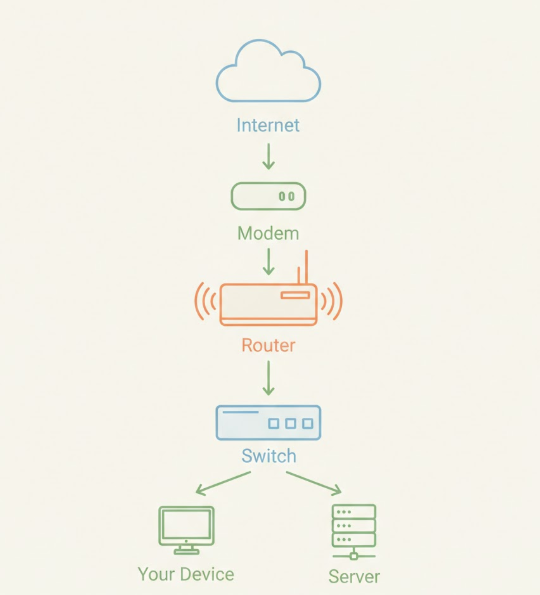
In production systems, you’ll also see:
Firewalls
Load balancers
Now let’s understand each piece.
What Is a Modem? (Your Internet Translator)
A modem connects your local network to your Internet Service Provider (ISP).
What it does:
Converts ISP signals (fiber, cable, DSL) into digital data
Brings the internet into your building
Analogy:
Think of a modem as a language translator between your home and the internet.
Without a modem:
You cannot talk to the ISP
No internet access exists
What Is a Router? (Traffic Director)
A router decides where network traffic should go.
What it does:
Routes traffic between networks
Assigns local IP addresses
Connects multiple devices to the internet
Analogy:
A router is like a traffic police officer at an intersection.
It decides:
Which packet goes where
Which device gets internet access
Hub vs Switch (Local Network Reality)
Hub (Old and Inefficient)
A hub sends incoming data to every device.
No intelligence
No filtering
Causes collisions
Analogy:
A hub is like shouting in a room, everyone hears everything.
Switch (Modern and Efficient)
A switch sends data only to the intended device.
Uses MAC addresses
Faster and more secure
Standard in modern networks
Analogy:
A switch is like a postman delivering letters to the correct house.
What Is a Firewall? (Security Gate)
A firewall controls what traffic is allowed in or out.
What it does:
Blocks unauthorized access
Applies security rules
Protects internal systems
Analogy:
A firewall is a security gate checking IDs before entry.
For developers:
Firewalls protect databases, APIs, and internal services
Most production outages involve firewall misconfigurations
What Is a Load Balancer? (Scaling Traffic)
A load balancer distributes traffic across multiple servers.
What it does:
Prevents server overload
Improves availability
Enables horizontal scaling
Analogy:
A load balancer is a toll booth system with multiple lanes.
Traffic is spread evenly so nothing gets jammed.
How All These Devices Work Together
In a real-world setup:
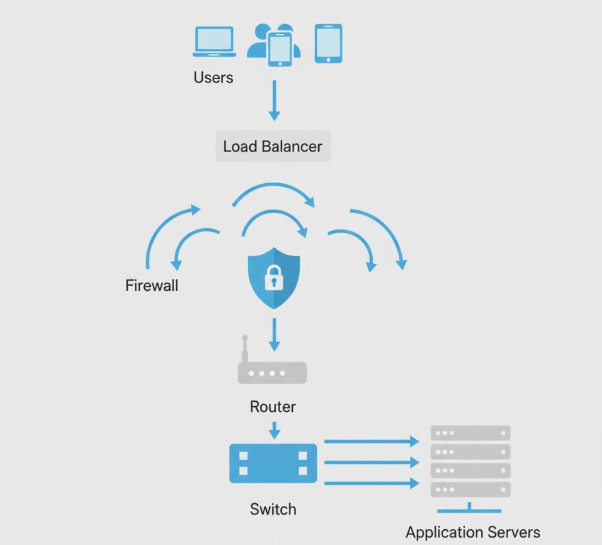
Each device solves a specific system problem:
Modem → Internet access
Router → Traffic direction
Switch → Local communication
Firewall → Security
Load Balancer → Scalability
Conclusion
Network devices work together to move, protect, and scale traffic from users to applications.
Each device has a single responsibility, connectivity, routing, security, or load distribution, which makes large systems reliable and manageable.
Follow for more….


